The Official AM Jili App Download Guide
Welcome to the official AM Jili app download guide for Filipino players. While the AMJili mobile website already runs smoothly in any browser, the dedicated app takes the experience further with faster loading, a cleaner full-screen layout, and convenient features like quick login. This page explains how to install the AM Jili APK on Android, how to set up AM Jili on iPhone and iPad, and how to keep your device safe while you do it.
An APK is simply the standard installer file used by Android apps. Because AM Jili is distributed directly to players, you download the APK from the official AM Jili link rather than from a general app store. That keeps you on the genuine, up-to-date version. Throughout this guide, the most important rule is simple: only ever download the app through the official AM Jili homepage or this page, never from a forwarded file or an unknown website.
Ready to begin? The steps below walk you through the Android install from start to finish, followed by the iOS setup and a short troubleshooting section. Once the app is on your device, the AMJili login guide shows the quickest way to sign in.
How to Download the AM Jili APK on Android
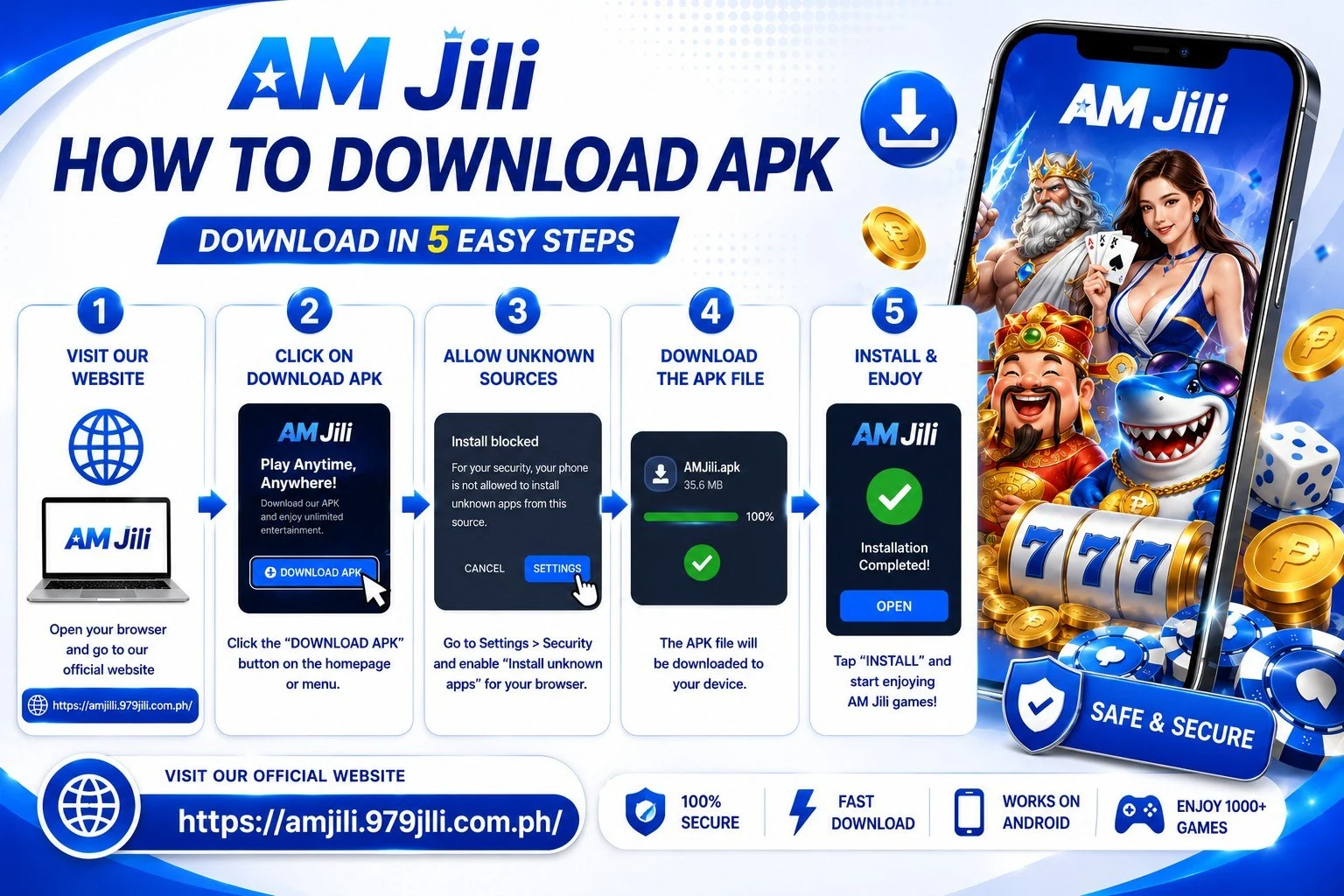
Follow these six steps to install the official AMJili app on your Android phone or tablet.
Step 1: Open the Official AM Jili Website
On your Android device, open your browser and go to the official AM Jili site. Confirm you are on the correct domain and that the padlock icon is visible. Starting from the official homepage guarantees you receive the genuine app file.
Step 2: Tap the App Download Button
Find and tap the App Download button. Your device begins downloading the AM Jili APK file. Depending on your connection, this usually takes only a few seconds, and you can watch the progress in your notification bar.
Step 3: Allow Installation From Unknown Sources
Because the app installs directly rather than through a general store, Android asks for permission the first time. When prompted, open Settings and allow installation from your browser, or toggle "Install unknown apps" for the browser you used. This is a normal, one-time step for directly distributed apps.
Step 4: Open the Downloaded APK
Tap the completed download from your notifications, or open your Downloads folder and select the AM Jili APK file. This launches the installer.
Step 5: Tap Install
Confirm by tapping Install and wait a moment while the app sets up. When it finishes, you will see the AM Jili icon added to your home screen and app drawer.
Step 6: Open the App and Log In
Launch AM Jili and sign in with your registered mobile number and password. If you are new, you can register from inside the app. For sign-in help, see the login guide.
How to Set Up AM Jili on iPhone and iPad
iOS handles apps differently from Android, so the setup is slightly different — but just as easy. Instead of installing an APK, iPhone and iPad users add AM Jili to the home screen straight from the browser. This creates an app-style icon that opens the platform in a clean, full-screen view with quick access to all your favourite games.
Quick steps for iOS:
- Open the official AM Jili website in Safari
- Tap the Share icon at the bottom of the screen
- Choose "Add to Home Screen" from the menu
- Confirm the name and tap Add
- Open AM Jili from your home screen and log in
That is all it takes. The AM Jili icon now sits alongside your other apps, giving you fast, app-like access whenever you want to play. Everything available on the website works the same way through this home-screen shortcut.
AM Jili App Requirements
The AMJili app is lightweight and designed to run well on a wide range of devices. Here is a quick overview of what you need for the smoothest experience.
| Requirement | Recommended |
|---|---|
| Android version | A recent Android release on most modern phones |
| iOS device | iPhone or iPad with an up-to-date browser |
| Internet | Stable WiFi or mobile data connection |
| Storage | A small amount of free space for the app |
| Account | An AM Jili account (free to create) |
If your device is reasonably current and connected to the internet, the app will run smoothly. A stronger connection simply means quicker loading, especially for live casino streams.
Download Safely: What to Watch For
Your safety matters, so it is worth taking a moment to download the right way. Because the AM Jili app is distributed directly, copycat sites sometimes try to offer fake versions. Following a few simple habits keeps you protected.
- Use the official link only: Always download from the official AM Jili site, never from forwarded files or unknown pages.
- Check the address bar: Confirm you are on the correct domain with the padlock icon before downloading.
- Bookmark the homepage: Save the official site so you return to the right place every time.
- Keep the app updated: Install new versions from this page when they become available for the best performance and security.
Stay alert: AM Jili will never ask you to install the app from a random link sent by message, nor request your password to "verify" a download. If something feels off, stop and reach out through the official contact page to confirm you are in the right place.
App Install Troubleshooting
The APK will not install
The most common reason is that installation from unknown sources is still turned off. Enable it for the browser you used to download the file, then open the APK again. Make sure you also have enough free storage on your device.
The download stops or fails
An unstable connection can interrupt the download. Switch to a stronger WiFi or mobile signal, clear any partial file from your Downloads folder, and start the download again from the official page.
The app runs slowly
Close background apps to free up memory, check your internet speed, and make sure you are on the latest version of the app. Restarting your device can also clear up temporary slowdowns.
I cannot log in after installing
Use the same mobile number and password from your registration. If you have forgotten your password, follow the reset steps in the login guide, or reach out to support for help.
AM Jili App Download FAQs
Quick answers to the most common questions about the AMJili app.